|
|

|

|
TCDL Bulletin Icon Abacus and Ghost Icons
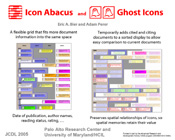
Icon abacus is similar to a grid except that the boundaries between cells in a given row are not limited to straight lines. Cells from different columns are given different background colors to make the boundary between cells easier to see. For example, in the left column of our poster, the documents are sorted vertically into sections by date. Icon abacus also communicates a second attribute (how soon the user plans to read the document) by putting each icon in one of the jagged columns. An icon abacus can save as much as a factor of three over grids. Ghost icons show all documents that are cited by a given document. Instead of providing a list of links to cited documents, ghost icons add a temporary icon for each cited document, sorted into the same spatial groups as existing icons, so that the attributes of the cited documents can be easily compared to those of existing documents. The temporary icons (drawn white) are called "ghosts" because they represent documents that are not yet fully part of the collection. Highlighting and dimming are used so four icon types can be distinguished: the selected icon, cited icons already in the collection, cited icons not present in the collection, and the rest of the icons. Animation is used during transitions, so the user can see what is changing. As the right column of our poster demonstrates, icon abacus and ghost icons can be used together.
© Copyright 2005 Eric A. Bier and Adam Perer Top | Contents |